Industrial Vacuum System Component 3D CAD Files
How-To Information Page
 Download CAD Files for our Suction Cups and Vacuum Components!
 Please click here to view our online catalog. Please click here to view our online catalog. |
 |
Step 1
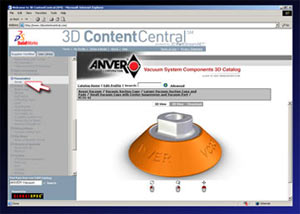
Visit ANVER’s 3D CAD Catalog and register for FREE!
Step 2
On the left navigation bar under the “Supplier Certified” tab, scroll down and click “Anver”.
Step 3
Navigate through the ANVER e-Catalog and select the desired part. Click the top “Download” button, select your file type and version from the drop-down list and click the corresponding downloads button and follow the instructions. |
| Vacuum System Components 3D Catalog |
|
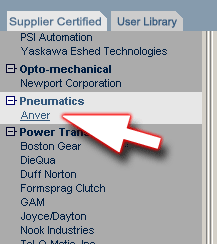
3D PartStream.net® is a CAD resource center containing many of ANVER’s products in every available CAD file format. 3D PartStream.net® is accessible 24 hours a day via the internet. Simply register to receive your user name and password and you can start downloading files on any of the 3D Partstream.net® websites. ANVER’s products can be found under the “Pneumatics” heading on the left side of the site.
Powered by:
 
|
| Available 3D File Conversions |
Available 2D File Conversions |
- SolidWorks Part / Assembly (.sldprt)
- CATIA V5 Part / Assembly (.catproduct)
- CATIA V4 Part / Assembly (.session)
- ANVIL (.igs)
- Ashlar – Vellum Argon, Cobalt, Xenon (.sat)
- CADKey 3D (.sat)
- AutoCAD 3D (.sat)
- IGES (.igs)
- Inventor (.sat)
- IronCAD (.sat)
- JPEG Files (.jpg)
- Mechanical Desktop (.sat)
- Acrobat (.pdf)
- Pro/E Part / Assembly (.prt)
- ACIS (.sat)
- SDRC I-DEAS (.step)
- SolidEdge (.x_t)
- STEP (.step)
- STL (.stl)
- Tiff (.tif)
- Unigraphics (.x_t)
- VDA (.vda)
- VRML (.wrl)
- Parasolid Binary (.x_b)
- Parasolid Text (.x_t)
- Edrawing Part / Assembly (.eprt)
|
- SolidWorks Part / Assembly (.slddrw)
- ANVIL Express (.dwg)
- AutoCAD 2D (.dwg)
- DWG files (.dwg)
- DXF files (.dxf)
- SolidWorks eDrawings (.edrw)
- Acrobat (.pdf)
- Tiff Files (.tif)
|
| ANVER has made the long term investment of offering a 3D CAD Library powered by 3D PartStream.net® on Content Central.
|